Zepp
- 4.4
- Rating
- 10.00M
- Installs
- Free
- Price

 Analysis by App-foxy
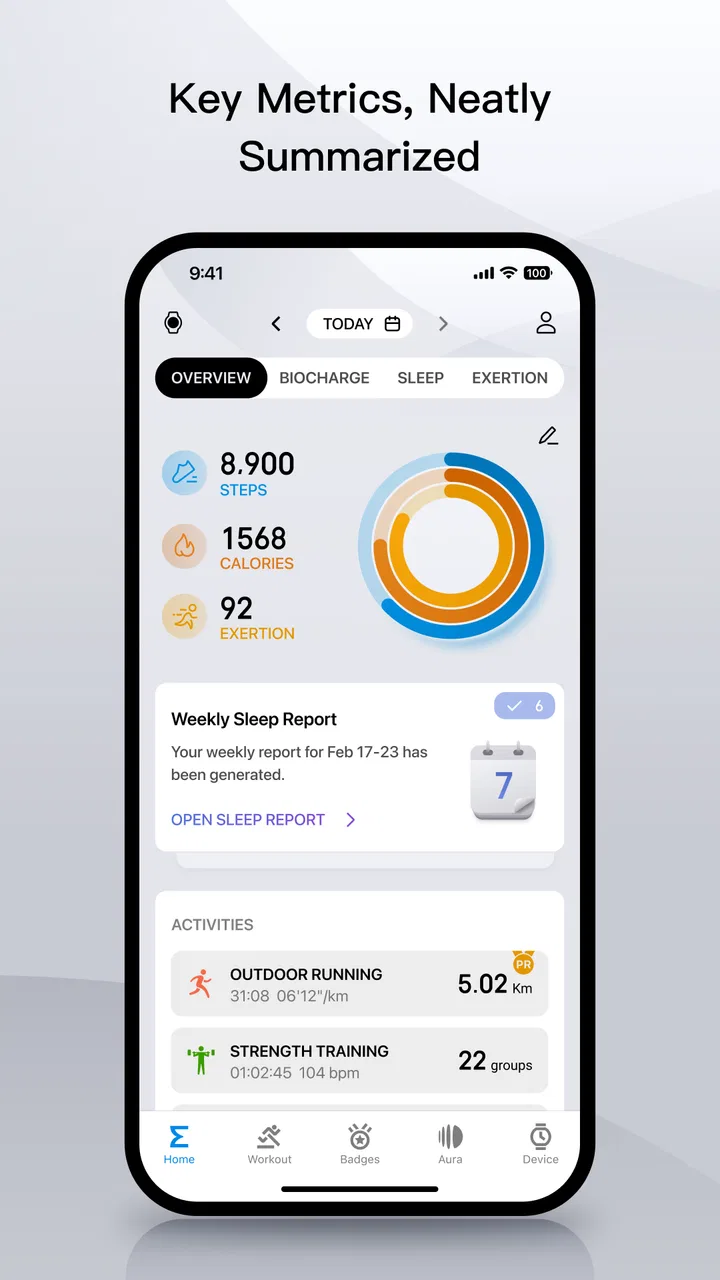
I started using Zepp as a practical way to keep health and sports information in one place, especially when a wearable is involved. It is not simply a step counter or a screen for daily numbers. The app acts as a personal digital health management platform, with the useful advantage of bringing activity, exercise, and related tracking into one routine. I found it most valuable when I treated it as a place for patterns rather than a source of instant answers.
That distinction matters in a household. A phone may be shared, a tablet may be used by more than one person, or one family member may help another keep an eye on exercise habits. Zepp can fit into that kind of routine, but it works best when each person has a clear account boundary and understands whose information is currently being viewed. I would recommend it to someone who wants a connected sports companion from Zepp, Inc., provided they are comfortable spending a little time organizing the setup instead of expecting everything to sort itself out.
How Zepp fits into everyday household routines
My most realistic use case is a home where one person wears a compatible device throughout the day and checks the app in the evening, while another family member occasionally helps interpret the information or plan the next workout. In that situation, Zepp is useful because it turns scattered moments into a repeatable habit: open the app, review the day, look at exercise progress, and decide what deserves attention tomorrow.
You May Also Like

 AccuWeather: Weather Radar
AccuWeather Review: A Quick, Clear Forecast for Everyday Decisions
For everyday plans, the best forecast is the one you can understand quickly. AccuWeather makes rain timing, radar, and local conditions easy to act on, with a few trade-offs.

 Hill Climb Racing
Why Hill Climb Racing Still Turns Crashes Into One More Run
A tiny car, a bumpy hill and one more upgrade: Hill Climb Racing keeps resurfacing because its simple chaos makes every near-miss feel personal.

 AliExpress - Shopping App
AliExpress Makes Global Shopping Feel Personal, but Shoppers Bear the Risk
AliExpress turns a global marketplace into a pocket-sized discovery engine. Its reach is useful, its shopping loop compelling, and its trade-offs easy to miss.

 Lords Mobile: Kingdom Wars
Lords Mobile Is a Kingdom-Building Routine, Not a Quick Match
A case-by-case verdict on the building, battles, device demands, and social commitments that make Lords Mobile rewarding for some players and exhausting for others.

 PDF Scanner app - TapScanner
TapScanner Makes Paperwork Easier to Capture, Check, and Share
TapScanner makes scanning with a phone feel less like a rescue operation and more like a dependable step in getting work done. Its capture tools are useful, though not flawless.

 Block Blast!
 Shows How Much a Puzzle Game Can Leave Out
A quiet grid game shows why puzzle players increasingly value instant clarity, repeatable skill and low-pressure play—and where the genre still needs to catch up.
More From Our News Desk
View All News


I would not use a shared phone as a reason to merge everyone’s information into one profile. A health app is personal by nature, and mixing records makes even simple trends difficult to understand. If two people use the same device, I would sign out or switch accounts carefully before opening the app for someone else. That small pause is more important than it sounds. A number that belongs to one person can easily be mistaken for another person’s activity when the household treats the phone like a communal screen.
Zepp is particularly comfortable for households that already have a wearable from the same ecosystem. The app gives the device a broader role: instead of checking isolated notifications or a single daily total, I can return to a central view and follow activity over time. That makes it easier to notice whether a workout routine is actually becoming consistent, rather than celebrating one unusually active day.
There is also a useful social boundary here. I would share encouragement, plans, or selected progress with family members, but I would not assume that everyone needs access to every health detail. Zepp works better when coordination is based on consent and clear conversations, not on leaving an account permanently open on a household phone. The app can support a shared routine without turning personal tracking into a family scoreboard.
What the first setup deserves attention
The initial setup is worth doing slowly. I would begin with the correct account, the correct person, and the correct wearable connection before exploring the rest of the interface. If a household member is helping, I would have that person nearby so the account owner remains in control of the sign-in and device pairing steps. This avoids the common mistake of building a long-term record under the wrong identity.
I also recommend deciding in advance who will use which phone. If the device owner normally checks Zepp on a personal phone, keeping that arrangement is simpler than moving the account between several family devices. A shared tablet can be convenient for occasional review, but it creates more opportunities to leave a session open or confuse one person’s records with another’s. The safest workflow is not complicated: one primary device, one clearly identified account, and deliberate switching when assistance is needed.
Another practical point is notification discipline. I would review what appears on a shared lock screen and decide whether those alerts are appropriate for the household. Even ordinary activity reminders can reveal that a particular person is using the app or wearing a device. This is less about changing the app’s purpose and more about respecting the difference between a private phone and a family room screen.
Because Zepp is free to download and use, it is easy to try without making an immediate purchase decision. However, the presence of optional in-app purchases means I would still check the purchase flow before handing the phone to a child or someone unfamiliar with mobile subscriptions and digital payments. Individual items range from a very small amount to a much higher premium price, so household supervision should focus on the account and device settings rather than assuming that “free” means every part of the experience has no cost.
Coordinating exercise without turning it into pressure
For coordination, I prefer using Zepp as a planning aid rather than a judge. A parent might help an older relative remember to review activity, or two adults might agree to take a walk after work and compare how the routine feels over several days. The app is more useful in those situations when the conversation stays focused on consistency and comfort instead of chasing a perfect number.
A good workflow is to choose one small question before opening the app. Did I move more regularly today? Did I complete the workout I planned? Is my current routine realistic for the week? Looking for one answer keeps the review process manageable and prevents the household from reacting to every fluctuation. I found that this approach makes the information easier to act on, especially when several people are involved.
There is a subtle trade-off between convenience and independence. A family member may want to help with setup, device charging, or checking a summary, but the account owner should still know how to open the relevant screens and understand the basic context. I would avoid creating a routine where one person becomes the permanent interpreter of another person’s data. That arrangement may seem efficient at first, yet it makes the app less useful when the helper is unavailable.
Zepp can also support a household member who is starting exercise gently. Rather than comparing their activity with someone else’s, I would use the app to establish a personal baseline and then look for changes over time. The important insight is that the same screen can serve very different goals: one person may care about training structure, while another simply wants a clearer picture of daily movement. A shared home does not require a shared target.
Age, trust, and sensible expectations
The app carries an Everyone content rating, which makes it approachable in a broad household context, but that should not be confused with medical suitability or automatic independence for every age group. I would be comfortable introducing it as a sports and health-tracking tool, while still explaining that its readings and summaries are aids for awareness rather than a diagnosis. Younger users may also need an adult to manage account access and purchases, even when the app itself is easy to understand.
For an older family member, the strongest benefit may be routine. A large, familiar process—wear the device, open Zepp, review the day—can be easier to maintain than a collection of separate sports apps. The weaker side is that any connected setup can become frustrating when pairing, syncing, charging, or account access needs attention. I would not describe the app as completely hands-off. Someone should be available to help when the device or phone stops behaving as expected.
Trust matters because health information can influence family conversations. I would not use Zepp to monitor someone secretly or treat its numbers as proof that a person is being responsible. The app gives context to activity; it does not replace a conversation about pain, fatigue, motivation, or personal circumstances. If a household cannot agree on who may view the information, I would keep the account private and use the app individually.
This is also where Zepp differs from a basic pedometer. A simple counter can be almost anonymous: open it, see a number, close it. Zepp is more connected and therefore more useful for people who want an ongoing relationship with their sports data, but that connection requires more care around accounts and devices. Someone who wants zero setup may prefer a simpler tool, even if it offers less context.
What I found useful beyond the obvious screens
One of the most useful habits I developed was checking the app after a normal day rather than only after a workout. That gives the information a more honest context. If I only open Zepp after deliberate exercise, I see the best part of my routine and miss the long inactive stretches that shape the rest of the day. Reviewing ordinary days makes the app more valuable for planning realistic changes.
A second insight is to use the app as a review point before changing equipment or routines. It is tempting to buy another accessory or switch to a different tracking method when progress feels unclear. I would first spend several days using the same device and the same review habit. Consistency in how I check the information often reveals whether the problem is the tool, the routine, or simply an unrealistic expectation.
A third useful approach is separating coordination from comparison. In a household, two people can agree on a shared activity—such as a walk or a regular training time—without comparing their recorded totals. This preserves motivation for people with different ages, abilities, schedules, or devices. Zepp becomes the place where each person reviews their own progress, while the family shares the activity itself.
I also found that the app rewards patience. A single reading can be interesting, but repeated use is where the personal value develops. I would avoid making decisions based on one unusual day, especially if the device was not worn consistently or the routine changed. The app is strongest when it helps me ask better questions about my habits, not when I treat every figure as a final verdict.
Where Zepp may frustrate you
The broad health-platform approach can feel heavier than a narrowly focused sports app. If all I want is a quick running timer or a minimal daily step display, Zepp may offer more surrounding information than I need. Its value comes from bringing several parts of a connected health routine together, so users who prefer one-purpose tools may find the experience less direct.
There is also a learning curve created by the relationship between the app, the wearable, and the account. When something does not appear as expected, the cause may not be obvious from the number on the screen. I would check the connection, the selected account, and whether the device was actually being used before assuming the app has lost information. That troubleshooting mindset is especially important on a shared phone.
The premium purchase range is another reason to stay attentive. The free entry point is attractive, but optional purchases mean the household should decide who is allowed to buy and which features are genuinely needed before spending. I would not pay simply because a premium option appears during exploration. First use the core routine, then decide whether an extra feature solves a real problem.
Zepp is also not the right choice for someone seeking a dedicated medical monitoring system. I see it as a sports and personal health companion, not as a substitute for professional advice, clinical equipment, or an appointment. If a user needs medically supervised tracking or a very specialized training analysis, a purpose-built service may be a better fit.
How it compares with simpler and more specialized alternatives
Compared with a basic pedometer, Zepp offers a richer connected experience and a better reason to return beyond checking one total. The trade-off is that it asks for more setup and more attention to account boundaries. Compared with a specialized running or cycling app, it is more suitable as a central everyday companion, while a dedicated sports tool may provide a deeper workflow for one particular discipline.
That makes the choice fairly clear for me. I would choose Zepp when I want a broad view of daily activity linked to a compatible wearable and when I am willing to maintain a regular review habit. I would choose a simpler alternative for a family member who dislikes accounts, syncing, and multiple layers of information. I would choose a specialist app when training analysis for one sport matters more than general household coordination.
The app’s established presence also gives it practical reassurance for people who do not want to experiment with an obscure tool. It has an average rating of 4.2 from around 1.4 million ratings, and it has passed the ten-million-install mark. Those figures suggest a substantial user base, but they do not remove the need to decide whether its connected approach suits your household. Popularity is helpful context, not a guarantee that every family will find the workflow comfortable.
My household verdict
After using Zepp, I see it as a capable choice for people who want their sports and everyday health routines organized around a connected device. Its strongest quality is not one isolated screen; it is the way it encourages a repeatable cycle of wearing, reviewing, and adjusting. For a household, that benefit appears when each person keeps a separate identity while sharing practical support.
I would recommend it to an adult who wants a free starting point, a wearable-centered routine, and enough room to grow into more regular tracking. I would also recommend it for families that can agree on privacy, account access, and purchase boundaries before making the app part of daily life. The current version is 9.15.2-play, and it supports Android 7.0 or later, which makes it accessible on many older Android phones as well as newer ones.
I would skip it for someone who wants a completely passive experience, dislikes connected accounts, or needs a specialized medical or sport-specific system. I would also avoid putting it on a permanently shared phone without a clear switching routine. That is not a flaw unique to Zepp; it is simply the point where personal health software and household convenience can conflict.
Overall, I find Zepp most convincing when used calmly and consistently. Keep profiles separate, review ordinary days, treat trends as guidance, and involve family members through agreed support rather than constant comparison. With those boundaries in place, this Sports app from Zepp, Inc. becomes a useful everyday companion instead of another screen full of numbers. It is free to begin, rated for Everyone, and worth trying if its connected approach matches the way you already manage activity at home.
FAQs for Zepp
01What is the main purpose of the Zepp app?
The Zepp app is designed to help users track and improve their fitness and health. It connects with smart wearable devices to monitor metrics such as heart rate, sleep patterns, and physical activity. It also provides insights and personalized recommendations to help users achieve their fitness goals.
02Is the Zepp app compatible with all smart devices?
While the Zepp app supports a wide range of smart wearable devices, it is essential to check compatibility with your specific device. Generally, it pairs well with Amazfit and other Zepp-branded products. Ensure your device's operating system is up-to-date for optimal performance.
03Does the Zepp app require a subscription for full access?
The Zepp app is free to download, and many of its features are accessible without any subscription. However, there may be premium features that require a subscription for full access. These can include advanced analytics and personalized training programs.
04How does the Zepp app ensure data privacy and security?
Zepp takes data privacy and security seriously, employing encryption and secure servers to protect user information. Users can review privacy settings within the app and adjust data sharing preferences. Always ensure you have the latest app version to benefit from security updates.
05Can the Zepp app be used offline?
The Zepp app requires an internet connection for syncing data and accessing certain features. However, many core functionalities, such as tracking workouts or viewing previously synced data, can be accessed offline. Once connected to the internet, the app will update any new information.
Pros
- User-friendly interface for easy navigation.
- Comprehensive health tracking features.
- Customizable notifications and alerts.
- Seamless integration with multiple devices.
- Detailed sleep analysis and insights.
Cons
- Limited third-party app integrations.
- Occasional syncing issues with devices.
- Some advanced features require subscription.
- Battery consumption can be high.
- UI can feel cluttered at times.

Zepp
Gallery